How to Choose Healthcare Scheduling Software: A Buyer's Guide

Choosing the right healthcare scheduling software can save hours of manual work, improve shift allocation and make complex clinical requirements easier to manage. But clinical staff schedules vary considerably between departments, from senior clinician coverage and specialty skills to on-call arrangements and staff preferences.
A platform that works for straightforward shift patterns may not handle these requirements effectively. The key is to assess how well each solution supports your clinical environment and how much of the scheduling work it can actually automate.
This guide is for clinical department leaders, clinical staff schedulers, and medical workforce managers evaluating a new platform. It explains how to assess clinical fit, compare automation capabilities and test the time savings, implementation effort and overall cost.
Define your healthcare scheduling needs
Before comparing software, consider what needs improving in your current scheduling process and what a new system needs to deliver.
Review your current scheduling process
Start with the work involved in preparing and managing each schedule. How much time goes into allocating shifts, checking compliance, balancing staff requests and making schedule adjustments? Which parts of the process are still handled manually?
Common scheduling challenges include:
- Schedules that take several days to prepare
- Uneven distribution of night shifts, weekends and other less desirable duties
- Clinical rules and staffing restrictions that are hard to track and easy to miss
- Last-minute changes that require substantial reworking of the schedule
Think about which of these problems has the greatest impact on your department. For some teams, reducing schedule preparation time will be the main priority. For others, it may be improving fairness, managing increasingly complex staffing requirements or making schedule changes easier to coordinate.
Record your current preparation time and the time spent managing changes after publication, so you have a baseline for comparing results.
Outline your clinical and operational requirements
Next, consider what your scheduling software will need to accommodate. Beyond the number of staff you're scheduling, think about the different roles, shift patterns, clinical rules and working arrangements involved.
Outline your key requirements:
- Staffing levels and demand: How do you ensure the right number of staff, with the right skills, are scheduled to meet patient demand and deliver safe, quality care?
- Shift patterns and roster cycles: What shifts and on-call arrangements do you manage, and how far in advance are schedules prepared?
- Clinical and contractual requirements: What staffing levels, qualifications, union agreements and working-hour restrictions need to be accounted for?
- Staff requests and preferences: How do you manage availability, leave requests and individual shift preferences?
If you're managing schedules across multiple departments or sites, you'll also need to consider whether each team can configure and manage its own rules and working arrangements within the same platform.
Understand your scheduling software options
Staff scheduling software varies considerably in how much of the scheduling process it can automate. Some platforms provide digital tools for building and managing schedules, while others can automatically allocate shifts or generate complete schedules.
The main differences are in how schedules are created and how much work remains for the person managing them.
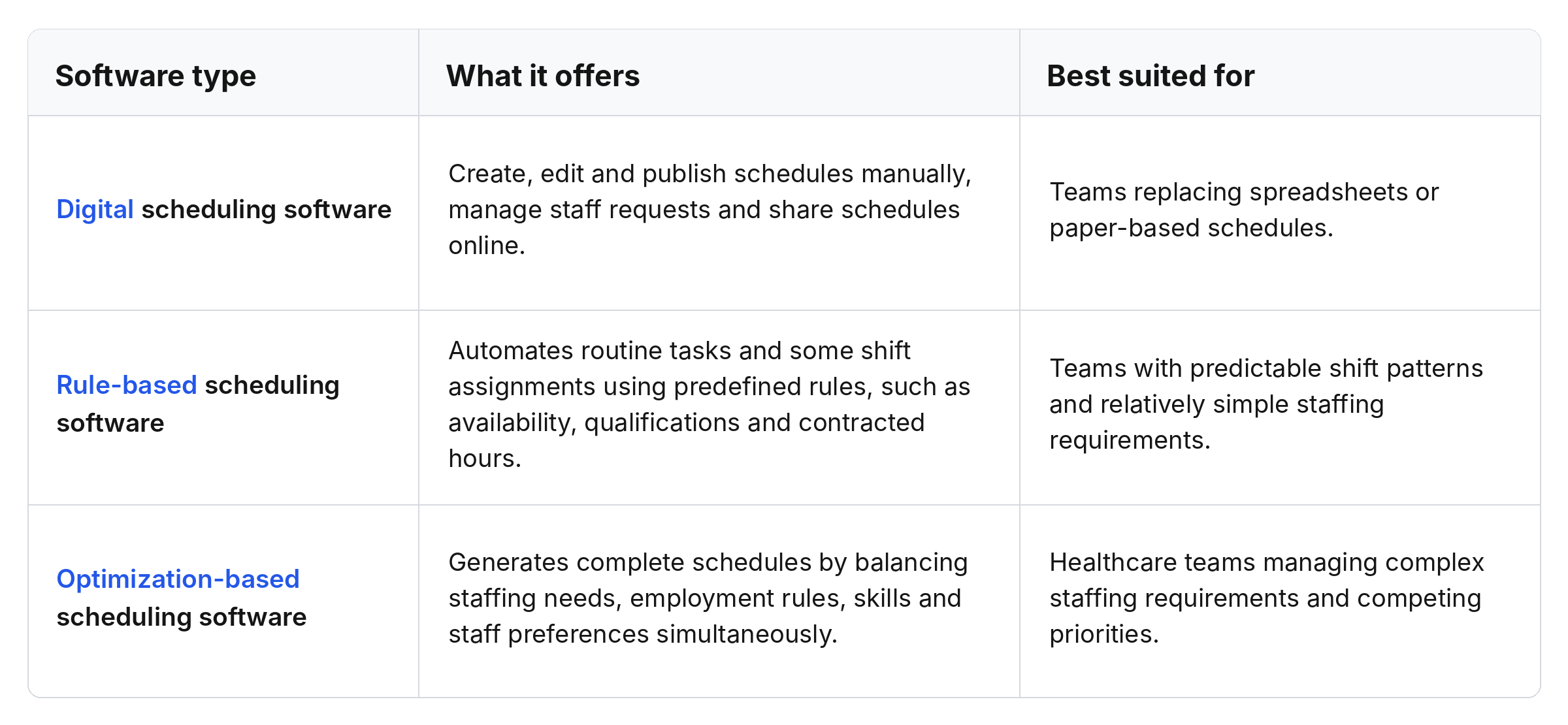
These categories aren't mutually exclusive, and some platforms offer capabilities across several levels. When comparing vendors, it's worth understanding exactly what the system automates and where manual intervention is still required.
Choosing between specialist and broader workforce management software
Broader workforce management platforms typically combine scheduling with functions such as payroll, time and attendance, leave management and workforce reporting. These can be useful for managing workforce operations across an organization, although their clinical scheduling capabilities vary between providers.
Specialist medical scheduling software focuses more closely on the requirements of clinical scheduling, such as qualifications, skill mix, working-hour restrictions and complex shift allocation. It can also work alongside existing HR and payroll systems, allowing organizations to introduce more advanced scheduling capabilities without replacing their wider workforce management setup.
The healthcare scheduling capabilities that matter
Once you've narrowed down the type of system you need, the next step is to assess what each platform can actually do. Here are the key capabilities worth evaluating:
Automated scheduling
One of the biggest differences between scheduling platforms is how much of the schedule they can create automatically. Some systems help managers fill individual shifts or apply predefined scheduling rules, but still require considerable manual work to complete the schedule. More advanced software can generate an entire schedule from your staffing requirements, taking clinical rules, restrictions and staff preferences into account.
For example, RosterLab automates schedule generation from configured staffing requirements, rules and preferences. Managers retain final control, reviewing the draft and making any adjustments before approving the final schedule.
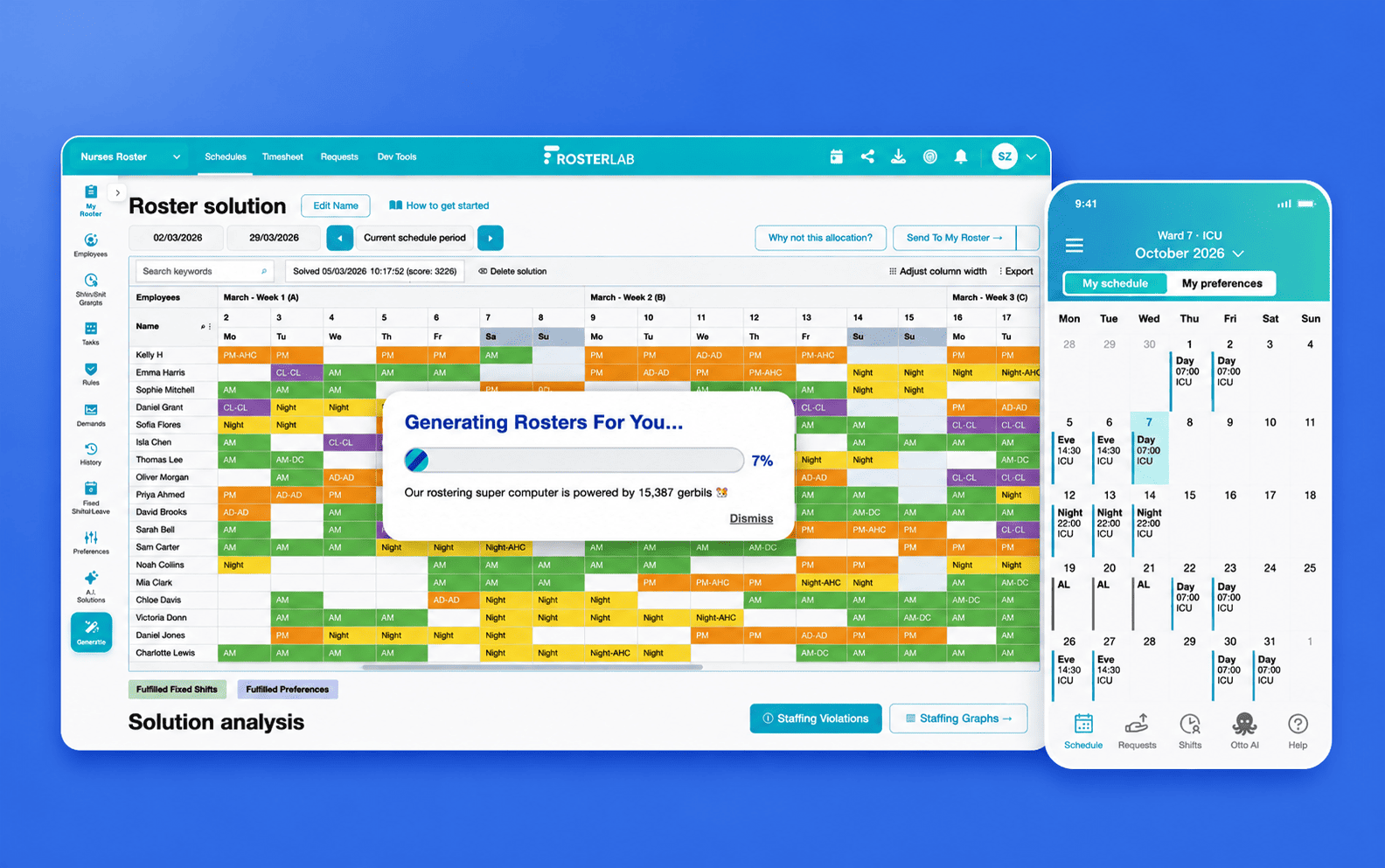
RosterLab AI Scheduling Software and Staff Mobile App
When evaluating automation, ask to see how the software builds a schedule from start to finish, including what happens when requirements conflict or adjustments are needed.
Learn more about what automated scheduling is and how it works
Fair shift allocation
A fair schedule doesn't necessarily mean giving everyone the same number of shifts. Staff may have different contracted hours, working arrangements and preferences, all of which affect how duties should be shared.
For example, night and weekend shifts may need to be balanced across several scheduling periods, taking previous allocations into account rather than treating each schedule in isolation.
Fairness can also mean different things to different clinical teams. Look for a flexible system that lets you customize fairness criteria and balance them according to your department’s priorities, alongside clinical coverage requirements. It should also make shift allocations easy to review, so you can identify imbalances and assess whether less desirable duties are shared appropriately among eligible staff.
Support for clinical rules
Clinical scheduling requirements vary across departments and specialties. An emergency department, for example, may need a particular mix of senior and junior clinicians on every shift, while radiology services may need to account for subspecialty qualifications and on-call coverage. 
The software should be able to accommodate these differences. Check whether these rules can be configured within the system and applied automatically when schedules are generated or adjusted, rather than relying on managers to check them manually.
The system should also distinguish mandatory requirements from staff preferences and make conflicts visible. Ask vendors to demonstrate what happens when available staff cannot meet the required coverage or rest rules, how unmet requirements are reported and how managers can review proposed changes.
Manage schedule changes
Changes to a published schedule are often unavoidable. The healthcare scheduling software should help managers respond quickly, without spending hours coordinating coverage or reworking shifts.
Useful capabilities include:
- Re-scheduling: Adjusts schedules in response to unexpected changes like sick leave, emergencies, or last-minute requests, while minimizing disruption to the rest of the schedule.
- Open shifts: Allows managers to offer vacant shifts to qualified, available staff, making it easier to fill gaps with less back-and-forth communication.
- Automated shift swaps: Approves routine swaps between qualified staff when configured staffing rules are met. Swaps affecting critical coverage, skill mix or compliance are flagged for manager review.
Staff preferences and self-service
Giving clinicians [greater flexibility and input into their work schedules](https://rosterlab.com/blog/benefits-of-flexible-staff-scheduling) can improve job satisfaction and support a better work-life balance. Staff should be able to submit shift preferences, request leave, pick up open shifts and arrange swaps through an [employee mobile app](https://rosterlab.com/solutions/staff-roster-mobile-app).
Check how approved leave and unavailable periods are distinguished from preferences, and how competing preferences are balanced against clinical coverage.
AI scheduling assistance
Some advanced healthcare scheduling platforms also include AI assistants that help managers better understand their schedules and make more informed scheduling decisions. RosterLab's AI scheduling assistant, Otto, can answer questions such as "How are night shifts distributed across my team?" or "Are there any staffing gaps next week?" It can also help identify workload imbalances, skill shortages and potential fatigue risks, providing useful insights and recommendations directly from schedule data without having to search through schedules and reports
Key questions to ask before choosing a healthcare scheduling platform
Use these seven questions to test how well a platform fits your team, what it takes to get started and the results you can realistically expect.
1. Will this work for a department like mine?
Ask vendors about their experience working with healthcare departments of a similar size and specialty. Have they successfully managed comparable scheduling requirements, including complex shift patterns, clinical rules and staffing restrictions? Case studies and customer examples can help you assess how well the software has worked in similar settings and what results other teams have achieved.
2. How much work will it actually save?
It is important to distinguish the time spent preparing inputs, generating a draft, reviewing it and managing changes after publication. At a Sydney tertiary hospital, RosterLab reports that the time spent preparing a 13-week emergency department schedule for more than 60 Senior Medical Officers fell from approximately 120 to 40 hours, a 67% reduction. This was achieved on the team's first schedule while they were adapting to the new system. Ask which activities are included in any quoted savings and whether setup time is measured separately.
3. Will setup become another project for my team?
Find out how much of the implementation the vendor handles and what your team will need to contribute. Will they help configure your existing scheduling and shift rules in the system and work with you to review and refine the first generated schedules? Also ask how long implementation typically takes, what training is included and what support is available once you're up and running.
Agree on who will validate and sign off on the first schedule, and who will maintain the rules when staffing arrangements change.
4. Can it work with our existing systems?
Your organization likely already uses systems to manage HR, payroll, leave and time and attendance. Consider what information needs to be shared with your scheduling platform, such as employee details, leave records and approved shifts, and whether this can happen through direct integrations or data imports and exports.
Check which integrations the vendor already supports, whether data can flow in both directions and what additional setup, costs or IT involvement may be required. Confirm whether each connection is already available or requires custom work, how often data is updated and who resolves synchronization failures.
5. How is staff data protected?
Ask what staff information the platform needs, where it is hosted, how access is controlled and what audit records are available. Confirm whether role-based permissions apply to AI assistant queries as well as schedule views. Involve your IT or security team early and ask what evidence is available to support your organization's privacy and security review.
6. What will the software actually cost?
When comparing pricing, make sure you understand what's included and what might cost extra. Some vendors charge per scheduled employee, while others offer custom pricing based on your organization's needs. Ask about implementation fees, training, integrations and ongoing support to get a clear picture of the total cost.
Estimate the value of time saved on scheduling using your own baseline. Treat potential reductions in temporary physician staffing costs or staff turnover as separate assumptions unless supported by evidence from your department. RosterLab's ROI calculator can help model potential annual savings; its outputs are estimates rather than guaranteed results.
7. What will I learn in a demo?
A demo should give you a realistic picture of how the software would handle your department’s scheduling requirements. Ask the vendor to demonstrate a representative schedule, then show how it handles an absence or conflicting request. Check clinical coverage, fairness and how easily managers can review and adjust the result. By the end, you should understand what the software automates, what still needs your input and whether it addresses your team’s main challenges.
Healthcare scheduling software buyer's checklist
Use this checklist to make sure you've covered all the essentials before making a decision.
For each item, record the evidence demonstrated, any limitations and the follow-up needed before committing.
Clinical suitability
☐ Accommodates our workforce size, specialties and shift patterns.
☐ Supports our clinical rules, employment agreements and staffing requirements.
☐ Allows different departments to configure their own scheduling requirements.
☐ Makes unmet mandatory requirements and proposed exceptions visible.
Scheduling capabilities
☐ Automatically generates complete schedules based on our requirements, with minimal manual adjustments.
☐ Balances staff preferences, workloads and fair shift allocation.
☐ Supports quick schedule adjustments with minimal disruption through rescheduling, open shifts and automated shift swaps.
☐ Provides useful reporting and insights into schedule quality.
Implementation and support
☐ Includes a clear implementation plan, training and ongoing support.
☐ Meets our organization's security and data privacy requirements.
Costs and proven results
☐ Provides transparent pricing, including setup and ongoing costs.
☐ Demonstrates measurable time savings for comparable healthcare teams.
☐ Can handle our specific scheduling requirements in a practical demo.
Choosing the right healthcare scheduling software
Ultimately, the right healthcare scheduling software depends on the complexity of your schedule, the capabilities you need and the improvements you're looking to achieve. Before making a decision, make sure the platform can handle your clinical requirements, demonstrate meaningful time savings and fit into your existing processes.
For healthcare teams managing complex schedules, RosterLab's AI scheduling platform helps make the process faster, fairer and easier to manage. That means less time spent preparing schedules, greater confidence in the finished schedule and more time back for clinicians and managers to focus on their patients.
Book a demo to discuss your scheduling challenges and see how RosterLab can help.
You might also be interested in

Ready to Transform Your Workforce Management?
Join thousands using RosterLab to streamline scheduling.