Automated Staff Rostering: What It Actually Is (And How to Spot the Real Thing)

Every roster cycle, a senior clinician sits down with a spreadsheet, a pile of leave requests, and a headache. A week later the roster finally goes out, and within the hour someone is complaining why they have been given three night shifts in a row again.
With the right system, that same roster could have been generated in minutes rather than built shift by shift over days. It would have spread the nights evenly, honoured the leave, and caught the fatigue breach before anyone saw it. That’s where automated staff rostering software comes in. It can build the staff schedule for you, weighing demand, staff preferences, skills, and compliance rules all at once.
Most rostering tools sold as “automated” don’t really do that. They hand you a tidy grid and check your finished roster for mistakes, which still leaves you doing the hard part by hand. True automation generates the roster. The best of it goes further and optimises, searching for the version that covers every shift and still feels fair to the people working it.
What is automated staff rostering?
Automated staff rostering (or auto-rostering) uses software, typically powered by artificial intelligence, to reduce the manual work involved in building and managing a roster. Automation can range from repeating roster patterns and filling open shifts to checking rules and generating a complete schedule.
The important distinction is how much of the rostering work the software actually takes on. At one end, it automates individual tasks while much of the actual rostering remains manual. At the other, it can build the roster from your staffing requirements, skills, availability, preferences and rules. Those are very different products sold under the same word.
Digital, automated, optimised: three words vendors blur
Digital, automated and optimised rostering are often used interchangeably, but they describe very different levels of rostering software. The key difference is how much of the work the system actually does for you.
- A digital rostering tool digitises what you already do. You still place every shift yourself; the software just helps catch the rules you might otherwise miss.
- An automated rostering system generates a valid roster for you, assigning staff to shifts based on the rules and requirements you set. For example, it can pair a senior clinician with two junior staff on a night shift, assign MRI shifts only to qualified team members, or prevent an early start after an evening shift.
- An optimised rostering system goes further. Instead of finding a roster that simply works, it searches for the best version across the priorities that matter to your team.
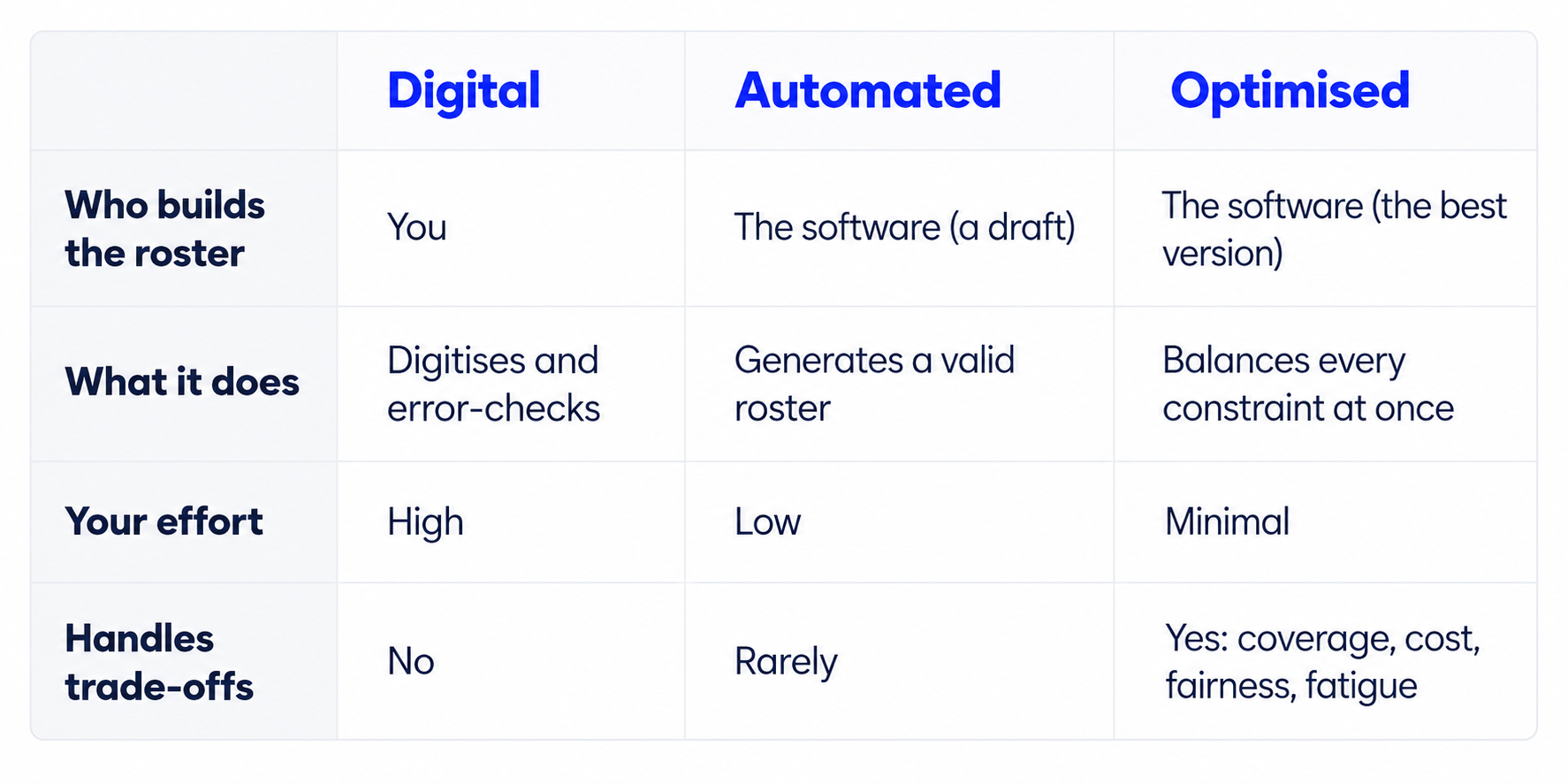
Generating a roster is the easy part. Generating one that covers every shift, respects every rule, and still feels fair to the people working it is the harder problem. That’s where optimisation becomes valuable.
The five levels of rostering maturity
So where does your current rostering process sit?
Think of it as a progression from doing the rostering yourself to the system taking on more of the work.
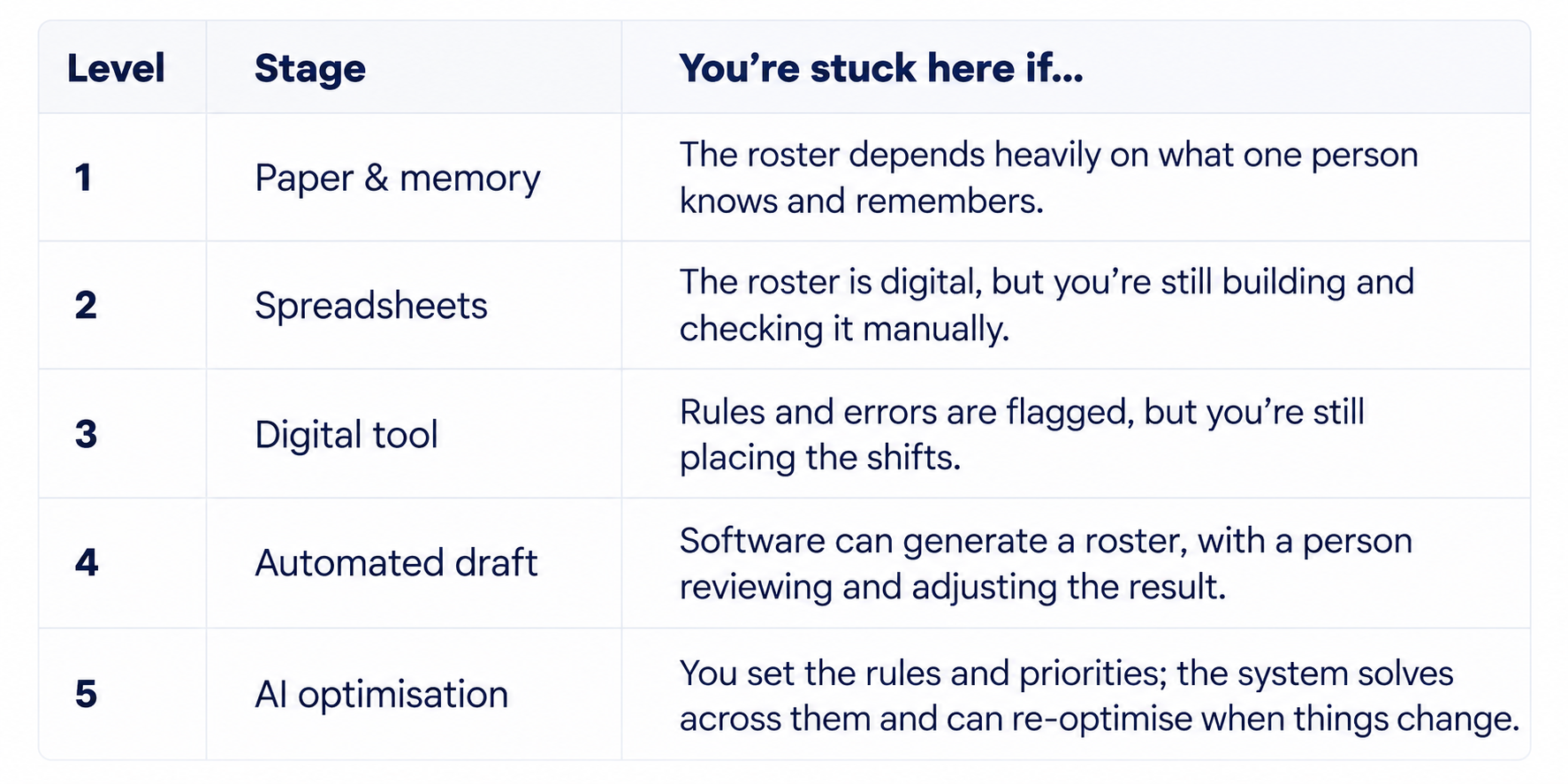
At the early levels, technology mostly records and checks decisions you've already made. As you move up, the system starts making more of those decisions with you, and eventually solving the roster as a whole.
How automated staff rostering works
Under the hood, an automated staff rostering system takes the information and rules a roster writer would normally have to juggle manually and solves them together as one complex problem.
It starts with the inputs: how many staff each shift needs, who is available and when they prefer to work, the staffing and skill mix required on each shift, the contractual and union rules, and the fatigue limits. Then the engine goes to work. Rather than filling the roster one shift at a time, an optimisation model considers all of these requirements together across the entire roster.
The result is a complete, compliant roster generated in minutes. When something changes, such as a staff member calling in sick, the system can re-optimise the affected roster rather than requiring the manager to reshuffle shifts manually.
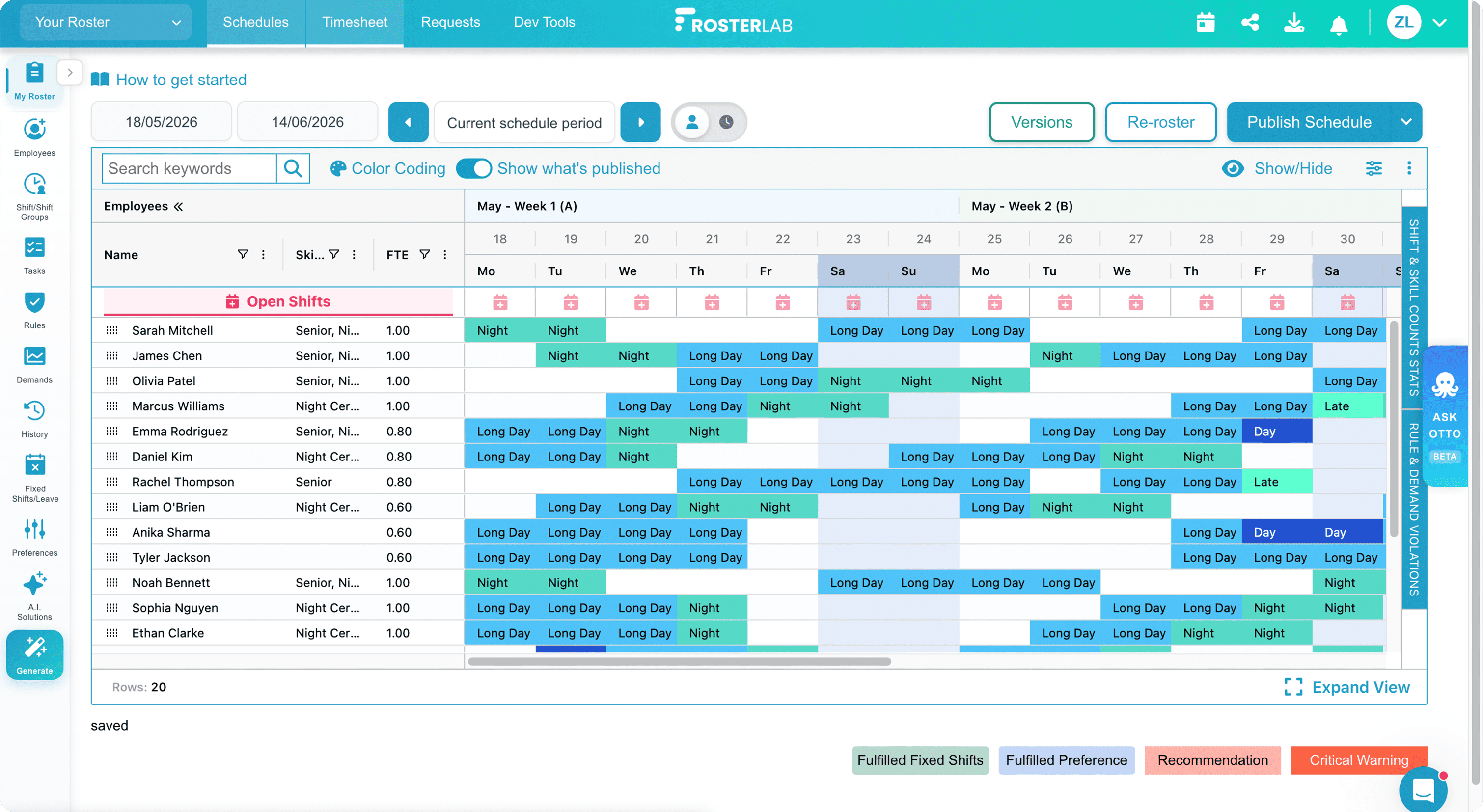
A complete staff roster generated in RosterLab AI rostering platform
The speed is the most obvious benefit, but optimisation can also improve the quality of the roster. Building manually usually means finding a roster that works. An optimisation engine can evaluate thousands of possible combinations to find one that better balances coverage, fairness, staff preferences and other priorities.
Where automated staff rostering fits best
Automated staff rostering fits best when the roster is complex, not merely time-consuming. That complexity is common in healthcare, with round-the-clock coverage, different skills and levels of seniority required on each shift, fatigue and compliance rules, and staff preferences to balance.
The same applies to other shift-based industries such as hospitality, call centres, manufacturing and veterinary care.
A simple test: automated rostering becomes more valuable when several of these apply:
- You manage 24/7 or complex shift coverage.
- Each shift requires a specific mix of skills, qualifications or seniority.
- Union or award rules and fatigue limits affect who can work when.
- Leave, staff preferences and last-minute changes have knock-on effects across the roster.
- Building or adjusting the roster regularly takes hours or days.
The more of these that apply, the more there is for automation to solve. For a small team with straightforward scheduling needs, AI rostering may be unnecessary, and a free digital rostering tool may be all you need.
What automated staff rostering won’t fix
Automated rostering can make better use of the workforce you have, but it cannot solve an underlying staffing shortage. If there are not enough people to safely cover a shift, the software cannot change that. Nor can it fix wider workforce issues such as retention, workload or workplace culture on its own.
Where it can help is in making better rostering decisions with the staff available. That means distributing shifts more fairly, meeting coverage and compliance requirements, accounting for staff preferences, and reducing the administrative work involved in building and maintaining the roster.
How to choose your automated rostering software
Not all rostering software offers the same level of automation. When comparing systems, these five questions can help you understand how much of the rostering work they will actually take on.
- Does it generate the roster for you, or only check the one you built?
- Can it account for your specific compliance requirements, including union or award rules and fatigue limits?
- Can it adjust the roster quickly when leave, absences or staffing requirements change?
- Does it give staff an easy way to submit preferences, manage availability and request swaps?
- Can it help you measure fairness across factors such as nights, weekends and other less desirable shifts?
The right system should reduce the manual work involved in building the roster while still giving you control over the rules and priorities that matter to your team.
Book a demo to see how RosterLab can turn your staffing requirements, rules and preferences into a complete roster in minutes.
Frequently asked questions
Is automated staff rostering the same as AI rostering?
Not exactly, although the terms often overlap. Automated staff rostering broadly means using technology to remove manual work from the rostering process. That might mean generating roster patterns, filling open shifts, or building an entire roster automatically.
AI rostering is a more advanced form of automation that uses optimisation and other AI techniques to weigh many competing requirements at once. RosterLab, for example, solves the entire roster as a whole, balancing coverage, skills, rules and staff preferences to find the best combination. AI tools like Otto, built into the rostering platform, can also help managers analyse their roster, test changes, and get intelligent scheduling recommendations.
Can automated rostering software handle union and award rules?
The good systems can. A capable tool lets you encode contractual rules and fatigue limits as hard constraints, so every roster it generates is compliant by default instead of checked after the fact. Basic auto-schedulers often can’t, which is why rule handling is one of the first things to test.
How long does it take to build a roster automatically?
Minutes, for a roster that used to take days. Teams moving from manual or spreadsheet rostering to an AI system commonly cut the manual work by around 90%. One radiology department went from 7–8 days to 2–3 hours per cycle.
Is automated staff rostering worth it for small teams?
If your team is small and stable with simple rules, a free digital rostering tool is usually enough. Automated and AI rostering start to pay off once you are running 24/7 coverage, complex skill mixes, and union or award rules. which is the point where building a fair, compliant roster by hand stops being feasible.
Does automated staff rostering replace the manager?
No. It removes the manual assembly, not the judgment. The manager still sets the rules, the priorities, and the staffing needs, reviews the result, and makes the human calls the data can’t. The software just does the hours of placement work in minutes.
You might also be interested in

Ready to Transform Your Workforce Management?
Join thousands using RosterLab to streamline rostering.